Choosing the right ecommerce platform is one of the first decisions you'll make when starting a dropshipping business. Shopify and WooCommerce can both support a dropshipping store, but they take very different approaches. Shopify offers a hosted, managed environment that lets you launch quickly, while WooCommerce gives you greater control over your website, hosting, and underlying code.
The better choice depends less on which platform has more features and more on what you need from your store. In this guide, we'll compare Shopify vs WooCommerce for dropshipping across setup, costs, maintenance, automation, operational risks, and scalability so you can choose the platform that fits your budget, technical experience, and growth plans.
Key Takeaways
- Shopify is easier to launch: Its hosted infrastructure, built-in security, and centralized management make it a strong option for beginners who want to start selling quickly without managing a server.
- WooCommerce offers more control: The open-source platform gives store owners greater control over hosting, code, data, themes, and extensions, but that flexibility also creates more maintenance responsibilities.
- Total cost matters more than the platform fee: Shopify combines hosting and core infrastructure into its subscription, while WooCommerce is free software but requires separate spending on hosting, domains, themes, plugins, security, and maintenance.
- Fulfillment automation affects both platforms: Once order volume grows, automated inventory synchronization, order processing, and tracking updates can become more important to daily operations than the platform itself.
Inside This Article
Is WooCommerce or Shopify Better for Dropshipping Beginners in 2026?
For most beginners, Shopify is the simpler option. Because it is a hosted ecommerce platform, you don't need to purchase and configure separate hosting before launching your store. You can choose a theme, add products, configure payments, and begin customizing your storefront without managing a server.
Shopify also handles much of the technical infrastructure for you, including hosting and platform-level maintenance. That reduces the amount of technical work a new dropshipping seller needs to handle before focusing on product research, marketing, and customer acquisition.
WooCommerce takes a more modular approach. The core plugin is free, but you first need a WordPress website and hosting environment. You then install WooCommerce, choose a theme, configure payment methods, and add the extensions required by your business.
That additional setup does not make WooCommerce a poor choice. It simply means that more responsibility sits with the store owner. If you already understand WordPress, hosting, plugins, or basic website management, the additional setup may be manageable. If you want to minimize technical work, Shopify generally provides the shorter path to launch.
Quick decision: Choose Shopify if speed, simplicity, and managed infrastructure are your priorities. Choose WooCommerce if flexibility, customization, and greater control over your website infrastructure matter more.
WooCommerce vs Shopify Dropshipping: Pros & Cons
Both platforms can support a successful dropshipping business. The main difference is how much of the technical and operational responsibility you want to manage yourself.
| Category | WooCommerce | Shopify |
|---|---|---|
| Setup | More configuration required | Faster, managed setup |
| Core software | Free and open source | Included with subscription |
| Hosting | Purchased separately | Included |
| Customization | Very high | High, within Shopify's ecosystem |
| Maintenance | Managed by store owner or developer | Mostly managed by Shopify |
| Support model | Community, documentation, developers | Centralized Shopify support |
| Best fit | Users prioritizing control and customization | Users prioritizing speed and simplicity |
WooCommerce Dropshipping Pros & Cons
WooCommerce's biggest advantage is control. Because it runs on WordPress and uses an open-source model, store owners have substantial flexibility over their website, hosting environment, themes, plugins, and custom code. You can also move your website between hosting providers instead of being tied to a single hosted ecommerce platform.
The trade-off is responsibility. You need to manage hosting, plugin compatibility, updates, backups, security, and performance. Those tasks may be reasonable for experienced WordPress users but can become a burden for a first-time seller.
Shopify Dropshipping Pros & Cons
Shopify's main advantage is simplicity. Hosting, core platform infrastructure, security, and platform updates are handled within the Shopify ecosystem, allowing store owners to spend more time on product selection, marketing, customer service, and sales.
The trade-off is that you have less control over the underlying infrastructure than you would with a self-hosted WooCommerce store. You also need to account for Shopify's subscription and app costs when calculating your total operating expenses.
Shopify vs WooCommerce Pricing for Dropshipping
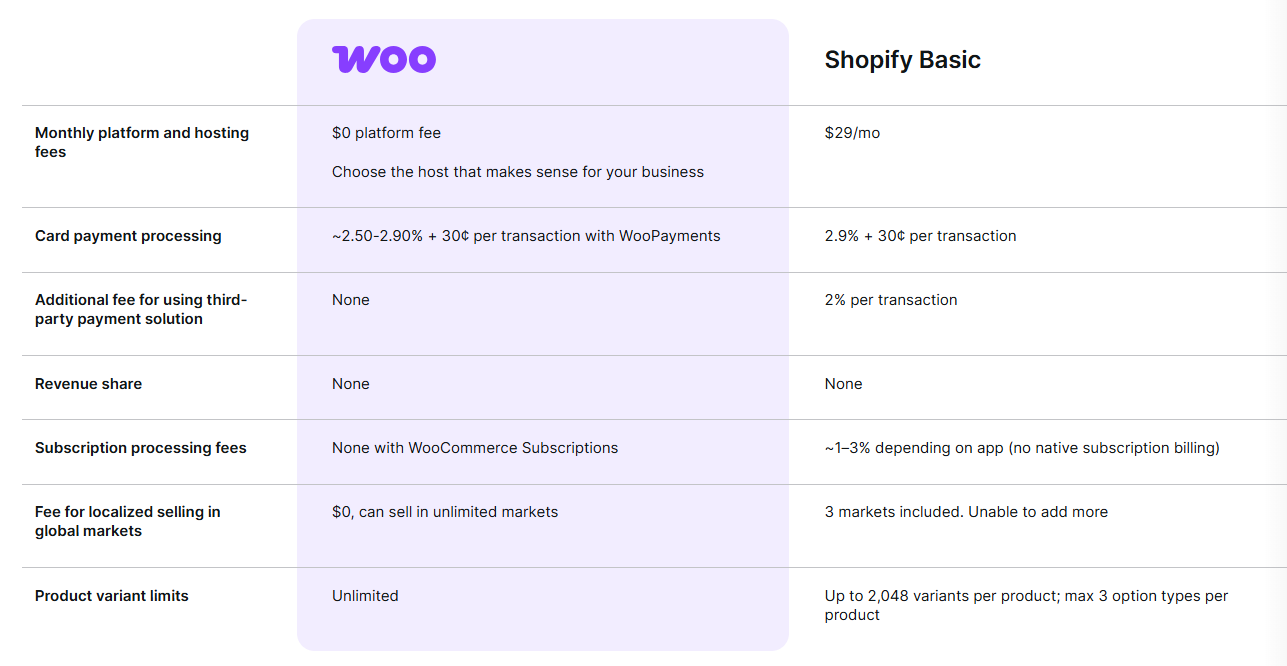
Comparing Shopify and WooCommerce only by their advertised platform price can be misleading. WooCommerce itself is free, but running a WooCommerce store requires hosting and may require paid themes, plugins, extensions, security tools, and developer support. Shopify combines the core platform and hosting into a recurring subscription, while additional apps and transaction-related costs can increase the total.
| Cost item | WooCommerce | Shopify |
|---|---|---|
| Core software | Free | Included in subscription |
| Hosting | Purchased separately | Included |
| Domain | Usually purchased separately | Usually purchased separately |
| Themes | Free and paid options | Free and paid options |
| Plugins / apps | Optional, depending on functionality | Optional, depending on functionality |
| Maintenance | Store owner / developer responsibility | Mostly managed by Shopify |
| Transaction / payment fees | Determined primarily by payment provider | Depends on Shopify Payments and plan/payment setup |
WooCommerce Pricing Breakdown
The WooCommerce plugin itself is free, but that does not mean a WooCommerce store has no operating costs. Your actual budget depends on the hosting environment and the features you add.
- Web hosting: Costs vary significantly depending on traffic, performance requirements, and the type of hosting you choose.
- Domain: Usually an annual registration cost that varies by domain extension and registrar.
- Theme: Free themes are available, while premium themes may add a separate cost.
- Plugins and extensions: Additional functionality such as marketing, analytics, shipping, payments, and automation may require paid extensions.
- Payment processing: Payment providers charge their own processing fees. These should be included when calculating your store's total cost.
A basic WooCommerce store can therefore be relatively inexpensive, but the total cost can increase as you add premium hosting, plugins, custom development, and other services.
Shopify Pricing Breakdown
Shopify uses a subscription model that combines the ecommerce platform with hosted infrastructure. This makes budgeting more predictable at the beginning, although paid apps, themes, and payment-related fees can increase the overall cost.
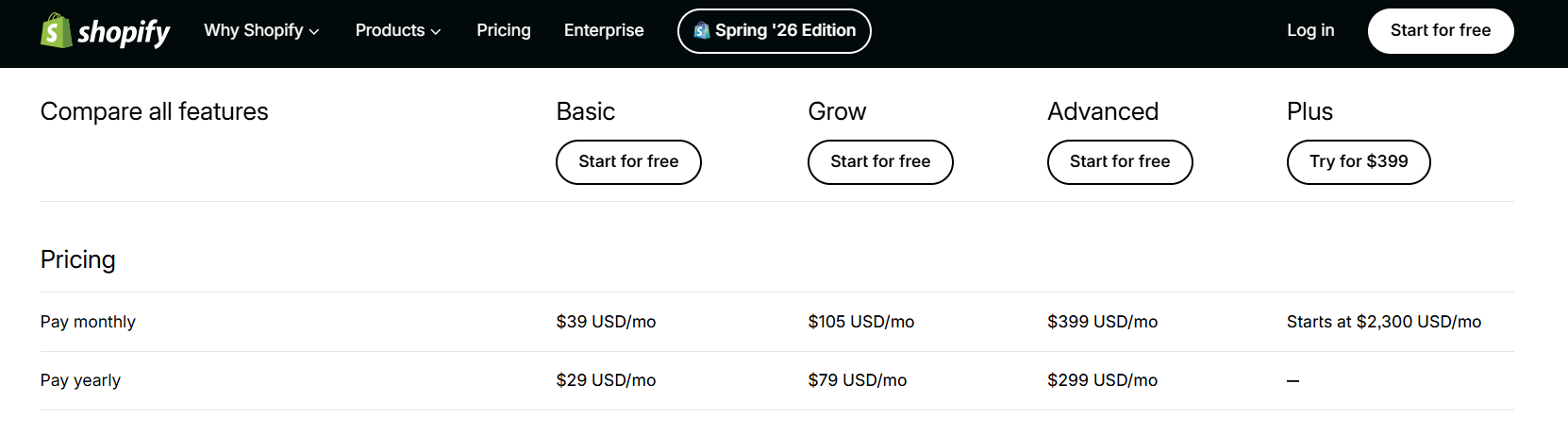
- Basic: Designed for merchants launching or operating a smaller store.
- Grow: Intended for businesses that need additional features as sales volume increases.
- Advanced: Designed for larger stores that need more advanced reporting and operational capabilities.
- Plus: Shopify's enterprise-oriented offering for higher-volume businesses with more complex requirements.
Payment processing costs also need to be considered. The exact rate depends on your payment setup, location, and Shopify plan, so merchants should check the current pricing that applies to their business before making a final platform decision.
How to Set Up Automated Order Fulfillment on Shopify and WooCommerce
Choosing between Shopify and WooCommerce is only part of building a dropshipping operation. Once orders begin coming in, the efficiency of your supplier and fulfillment workflow can directly affect how much manual work your team has to handle.
With automated dropshipping fulfillment, product information, inventory, orders, and tracking data can be synchronized between your store and supplier system. Instead of manually copying every order to a supplier, merchants can use an integration or connector to reduce repetitive work.
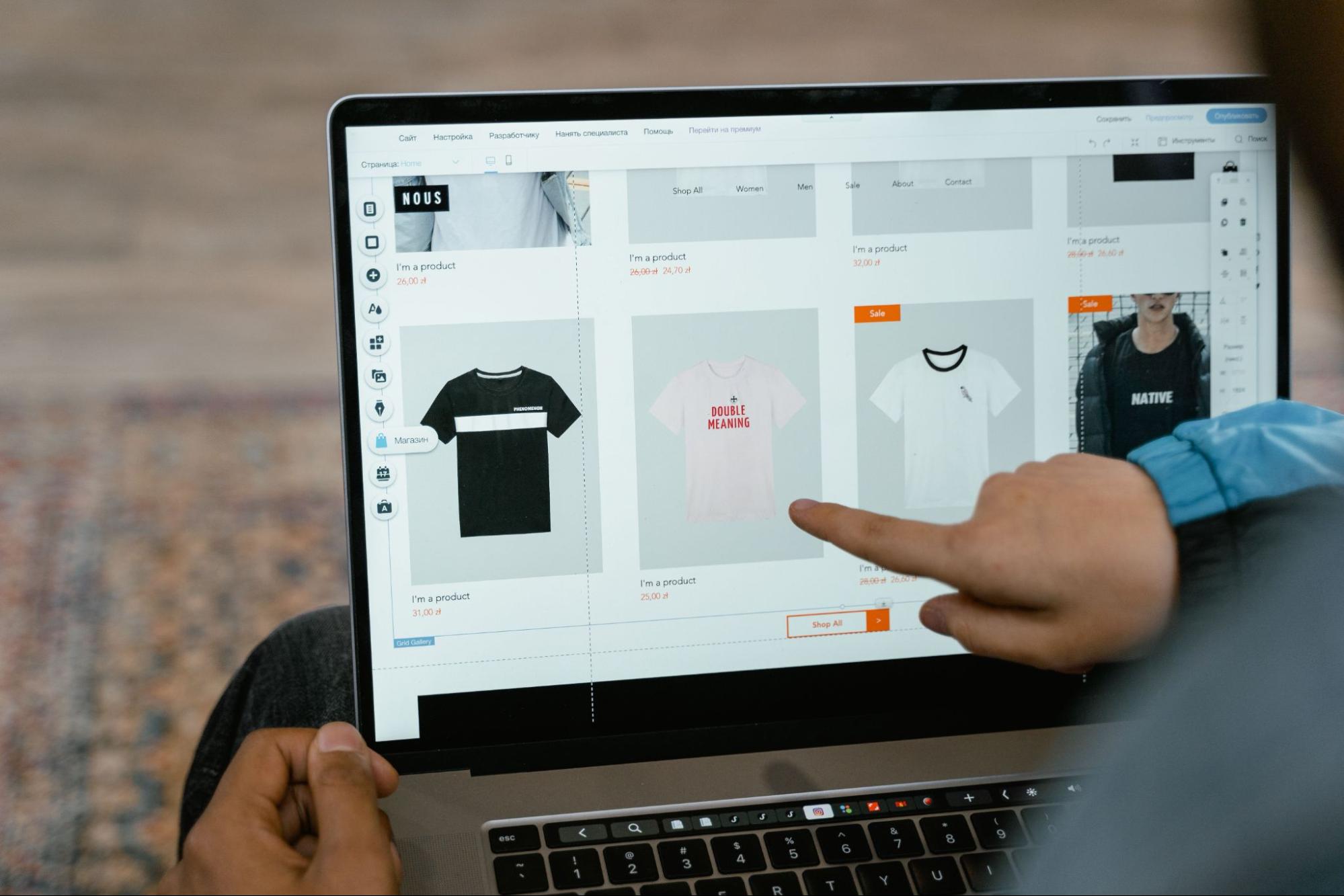
A typical dropshipping automation workflow looks like this:
- Connect your store: Install the appropriate supplier integration app on Shopify or plugin on WooCommerce.
- Import products: Connect the supplier catalog and select the products you want to sell.
- Synchronize inventory and pricing: Configure the integration to keep product availability and other relevant information updated.
- Automate order processing: Send paid orders to the supplier without manually entering each order.
- Sync tracking information: Once an order ships, tracking information can be passed back to the store so customers can follow their shipments.
The goal is not to eliminate every manual task. Instead, automation should handle repetitive processes while the store owner focuses on exceptions, supplier quality, customer service, and business growth.
Both Shopify and WooCommerce can support supplier integrations, but the specific workflow depends on the supplier and integration solution you choose. Shopify generally offers a more centralized app-based experience, while WooCommerce provides additional flexibility through its broader plugin ecosystem.
Shopify vs WooCommerce: Operational Risks to Consider
Platform choice affects how operational risk is managed, but neither Shopify nor WooCommerce eliminates business risk. The key difference is where that responsibility sits.
With Shopify, your store operates inside Shopify's hosted environment. This reduces the need to manage servers and platform security yourself, but it also means your business depends on Shopify's platform policies, account requirements, and infrastructure. Merchants should understand the platform's terms and maintain appropriate backups and operational records.
WooCommerce gives you greater control over the hosting environment, but that control comes with more responsibility. Outdated plugins, incompatible extensions, poor hosting configuration, or inadequate backups can create security and performance problems.
There is also a third category of risk that affects both platforms: supplier and fulfillment performance. Stock inaccuracies, delayed processing, poor product quality, and unreliable shipping can damage customer trust regardless of whether your storefront runs on Shopify or WooCommerce.
The key operational question
Who is responsible when something goes wrong? Shopify shifts more infrastructure responsibility to the platform. WooCommerce gives the merchant more control but also more technical responsibility. In both cases, supplier reliability remains critical to fulfillment performance.
Scale Your Store With Automated Supply Chain Solutions
Your ecommerce platform is the storefront, but your supply chain is the operational backbone behind it. As order volume increases, product sourcing, inventory accuracy, order processing, shipping, and tracking become increasingly important to the customer experience.
A supplier integration can help merchants manage product catalogs, inventory levels, orders, and shipping information from a connected workflow. This can reduce repetitive administrative work and make it easier to identify issues before they affect customers.
For example, when supplier inventory is synchronized with your store, you can reduce the risk of continuing to sell products that are no longer available. When tracking information is synchronized after fulfillment, customers can receive shipment updates without requiring the merchant to update every order manually.
At low order volumes, many sellers can manage these tasks manually. As order volume grows, however, repetitive processes can quickly consume time and introduce errors. Automation becomes increasingly valuable when a store needs to process dozens or hundreds of orders while maintaining consistent inventory and fulfillment workflows.
Final Thoughts: Shopify or WooCommerce for Dropshipping?
Both Shopify and WooCommerce can support a successful dropshipping business. The better option depends on how you want to balance simplicity, control, cost, and technical responsibility.
Choose Shopify if you want to launch quickly, minimize server and maintenance work, and manage your store through a centralized ecommerce platform.
Choose WooCommerce if you want greater control over your website, hosting, code, and customization options and are comfortable taking on more technical responsibilities.
Whichever platform you choose, your sourcing and fulfillment infrastructure still matters. Reliable inventory synchronization, efficient order processing, accurate tracking, and consistent supplier performance can have a direct impact on your ability to scale.
If you're looking for a dropshipping solution that can connect your store with product sourcing and fulfillment workflows, explore EPROLO and evaluate whether its integrations and services fit your Shopify or WooCommerce operation.
FAQs about Shopify vs WooCommerce Dropshipping 2026
Is WooCommerce cheaper than Shopify for dropshipping?
WooCommerce can have a lower starting software cost because the core plugin is free. However, hosting, premium themes, plugins, security, maintenance, and development can increase the total cost. Shopify has a recurring subscription but includes hosted infrastructure. Compare the total cost of ownership rather than the platform fee alone.
Is WooCommerce harder to manage than Shopify for small business sellers?
Generally, yes. WooCommerce requires merchants to manage more of the hosting, plugin, security, and update stack. Shopify handles most of the underlying infrastructure, which can make it easier for small teams and first-time sellers.
Do I need coding skills to run a WooCommerce dropshipping store?
No. Many WooCommerce stores can be created using visual interfaces, themes, and plugins without writing code. However, technical knowledge becomes more useful when you need to troubleshoot hosting, plugin conflicts, performance, security, or custom functionality.
Which is better for dropshipping: Shopify or WooCommerce?
Shopify is generally better for sellers who prioritize speed and simplicity. WooCommerce is often a better fit for sellers who prioritize control and customization. Both can work with dropshipping suppliers and fulfillment integrations, so your supplier workflow should also be part of the decision.
Related Reading
- Shopify in 2026: Your Guide to How It Works
- 18 Best Shopify Dropshipping Suppliers in 2026
- 12 Best WooCommerce Dropshipping Suppliers in 2026
- Start a Profitable WooCommerce Dropshipping Store in 2026
- 10 Best E-commerce Platforms for Dropshipping in 2026
- BigCommerce vs Shopify: Which Is Better for Ecommerce in 2026?
Written by
Josie
Josie is a skilled marketing specialist with expertise in TikTok, Facebook, and YouTube. She excels at audience growth and social media account management, consistently delivering valuable insights across key social marketing channels. Her strategic approach helps brands build meaningful engagement and expand their digital presence effectively.